Part 3 – Create the angry bird character
Introduction
Here the third tutorial to learn how to create a physic based game like Angry Birds in Flash.
You can download the complete sources here: https://benoitfreslon.com/wp-content/uploads/2013/04/How_to_create_a_game_like_angry_birds_part3.zip
If you missed the first tutorial you can find it here: https://benoitfreslon.com/fr/tutorial-how-to-create-a-game-like-angry-birds-with-box2d-world-construction-kit-flash-part-1
In this tutorial we will create the Bird character. We will add some very simple interactions like: shooting, repositioning.
[swf:https://benoitfreslon.com/wp-content/uploads/2013/04/main1.swf 800 400]
Modifications
I modified the world settings in order to have a smooth moving.
Click on the World MovieClip in the stage and set this properties:
- gravityY = 2
- timeStep = 0,04
Bird creation
Create a new symbol:
- Insert > New Symbol > Type: MovieClip
- Name: Bird
- Check: Export for ActionScript
- Class: Bird
- Ok
- Draw a red circle in the center of the MovieClip
- Set the size to 30×30 from the properties panel.
- Draw the bird face and the wings like this
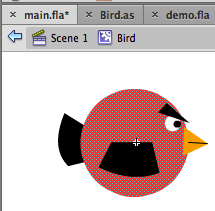
You also can download my sprite:

Great now add an instance of Bird in the World:
- Double click in the World MovieClip in the library
- Drag and drop the Bird instance in the World MovieClip

Now create the Bird class file:
- File > New > ActionScript 3.0 Class > Class name: Bird > OK
- File > Save as > Save the file in the same folder of the main.fla file

Finally replace the code in the class by this one:
package {
	import flash.events.Event;
	import flash.utils.*;
	import flash.geom.*;
	import Box2DAS.*;
	import Box2DAS.Collision.*;
	import Box2DAS.Collision.Shapes.*;
	import Box2DAS.Common.*;
	import Box2DAS.Dynamics.*;
	import Box2DAS.Dynamics.Contacts.*;
	import Box2DAS.Dynamics.Joints.*;
	import cmodule.Box2D.*;
	import wck.*;
	import shapes.*;
	import misc.*;
	import extras.*;
	public class Bird extends Circle {
		/** State of the bird. preparing, shooting */
		public var state:String;
		/** Check if the player press the button to shoot */
		private var willShoot:Boolean = false;
		/** Check if the player press the button to reset the bird position */
		private var willReset:Boolean = false;
		/** Power of the shoot */
		private var power:Number = 0;
		/** Get the angle in radians between the mouse cursor and the bird */
		private var angleRadian:Number = 0;
		/** Init x position of the bird */
		private var initX:Number = 0;
		/** Init t position of the bird */
		private var initY:Number = 0;

		/** Constructor method, called when the bird instance is created */
		public function Bird() {
			// constructor code

		}
		/** Called when the bird is added to stage by box2d */
		override public function create():void {

			// Init position
			initX = x;
			initY = y;

			trace("create");

			// Physic properties
			density = 10;
			friction = 1;
			reportBeginContact = true;
			reportEndContact = true;
			reportPostSolve = true;
			reportPreSolve = true;
			allowDragging = false;
			super.create();

			// Reset the bird at the begining
			reset();

			// Add a loop, called 30 times per second
			listenWhileVisible(world,StepEvent.STEP, step,false, 0);
			trace("create end");
		}
		/** Set the physic shapes and the size */
		override public function shapes():void {
			// 15 px of raduis
			circle(15);
		}
		/** Reset the bird */
		private function reset():void {
			trace("reset");
			// In order to move the body physic shapes we have to set the type to Animated
			type = "Animated";
			// Set the init position
			x = initX;
			y = initY;
			rotation = 0;
			// State when the bird is ready to be shooted
			state = "preparing";
			// Reset booleans
			willReset = false;
			willShoot = false;
		}
		/** Loop method */
		public function step(e:Event):void {
			// If the bird is ready to be shooted and the player press the mouse button
			if (state == "preparing" && Input.mouseIsDown) {
				// Mouse down
				trace("mouse is down");
				prepareShoot();

			} else if (state == "preparing" && !Input.mouseIsDown && willShoot) {
				// If the player release the button when the bird is ready to be shooted
				shoot();
			} else if (Input.mouseIsDown && state == "shooting") {
				// If the bird is shooted and the player press the mouse button
				willReset = true;
			} else if (!Input.mouseIsDown && willReset) {
				// If the bird is shooted and the player release the mouse button
				reset();
			}
		}
		/** Prepare to shoort method */
		private function shoot():void {
			trace("shoot power:", power);
			// The bird will be moved by the physic engine with type: Dynamic
			type = "Dynamic";
			// Get the impulse force
			var powerX:Number =  - power * Math.cos(angleRadian);
			var powerY:Number =  - power * Math.sin(angleRadian);
			// Aplly the impulse force
			b2body.ApplyImpulse(new V2(powerX, powerY), b2body.GetWorldCenter());
			// Switch state to shooting
			state = "shooting";
		}
		/** Prepare to shoot method */
		private function prepareShoot():void {
			// Get the mouse position in the world MovieClip
			var mouse:Point = Input.mousePositionIn(world);
			// Get the distance between the mouse and the bird
			var distanceMouse:Number = Point.distance(mouse,new Point(x,y));
			// Limit the distance to 150px in order to limit the impulse force
			if (distanceMouse > 150) {
				distanceMouse = 150;
			}
			// Set the boolean willShoot to true
			willShoot = true;

			// Convert distanceMouse to impulse force
			power = distanceMouse / 13;

			// Get the radians angle between the mouse and the bird
			angleRadian = Math.atan2(mouse.y - y,mouse.x - x);
			// Orient the sprite to the shoot direction
			rotation = angleRadian * 180 / Math.PI + 180;
		}
	}
}

