In this little tutorial you will learn how to create a gravity like a Mario platformer.
Let’s start!
Get files
- Save these 2 sprites (Right click > Save as)


- Open Flash and create a new ActionScript 3.0 document.
- Document properties: 24 fps, 550×400 by default.
Create the Hero MovieClip
- Create a new Symbol: Insert > New symbol > MovieClip
- Symbol name: Hero
- Check Export for ActionScript
- And Click OK
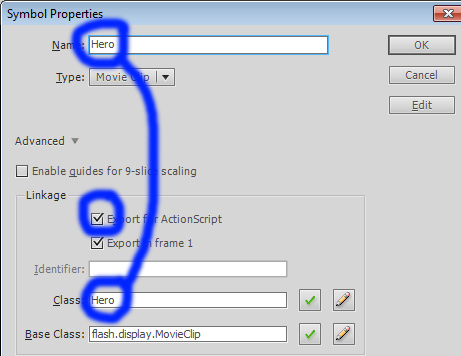
- Now you are in you Hero symbol! Perfect!
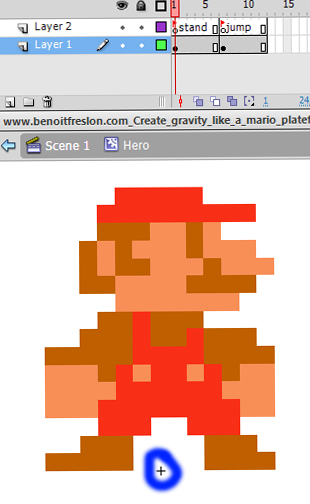
- Import the first sprite: mario_stand.png on the first frame:
- File > Import > Import to stage > mario_stand.png
- Set the sprite just on the top of the little black cross (pivot point)
- Now create an empty keyframe on the timeline:
- Timeline > 2nd frame on the timeline > Right Click > Create empty Keyframe
- Import the second sprite: mario_jump.jpg on the second keyframe
- Then create a new layer on the top and set 2 labels names
- Insert > Timeline > New layer
- And add 2 labels names:
- On the timeline click on the first key frame with the mario_stand.png sprite and go to the Properties pannel > Label > Name > stand
- On the timeline click on the second key frame with the mario_jump.png sprite and go to the Properties pannel > Label > Name > jump
Add the jump script
- Back to the main scene: Click on the Scene 1
- Add a new layer named “Actions”: Insert > Timeline > New layer
- And open the Actions pannel: Timeline > Actions Layer > Keyframe > Right click > Actions
- Finally copy and paste this code:
// The game gravity
var gravity = 0.8;

// The floor position (y)
var floor = 300;

// Add the hero MovieClip
var hero = new Hero();
// Set the x position
hero.x = 550 / 2;
// Set the y position on the floor
hero.y = floor;
// Set the hero state to "stand"
hero.gotoAndStop("stand");

// Add hero on the display list
addChild(hero);

// Create and set the speedY property to 0
hero.speedY = 0;
// Create and set the jump impulsion to 10
hero.impulsion = 10;
// Add an enter frame event
hero.addEventListener(Event.ENTER_FRAME, heroEnterFrame);
function heroEnterFrame(pEvent)
{
	// On each frames...

	// Set the world gravity
	hero.speedY +=  gravity;

	// Move the hero with his speedY
	hero.y +=  hero.speedY;

	// If the y property is larger than the floor position
	if (hero.y > floor)
	{
		// Set the hero on the floor
		hero.y = floor;
		// Cancel the current speed
		hero.speedY = 0;
		// Change the state to stand
		hero.gotoAndStop("stand");
	}
}

// Add a mouse event on the stage
stage.addEventListener(MouseEvent.MOUSE_DOWN, mouseDown);

function mouseDown(pEvent)
{
	// When the user click on the stage...

	// If the hero is standing
	if (hero.currentLabel == "stand")
	{
		// Set the new speedY with the hero impulsion
		hero.speedY =  -  hero.impulsion;
		// And change the state to jump
		hero.gotoAndStop("jump");
	}
}
[swf:/wp-content/uploads/2011/02/www.benoitfreslon.com_Create_gravity_like_a_mario_plateformer.swf 550 400]
Download sources: www.benoitfreslon.com_Create_gravity_like_a_mario_plateformer

